Dr.Fone is an all-in-one mobile device management toolkit developed by Wondershare that helps everyday users and tech-savvy individuals recover lost data, unlock locked screens, repair system issues, transfer files, and manage their phones from a desktop. Unlike single-purpose tools that only do one thing, Dr.Fone bundles a full suite of features for both iOS and Android into one desktop application. Pricing starts from $29.95 for the Basic plan, with a free trial available. This review covers Dr.Fone’s features, pricing tiers, ease of use, real user feedback, and who it’s genuinely best suited for — so you can make a confident decision.
Dr.Fone Review — Quick Verdict

At a Glance
- Best for: Individuals switching phones, recovering lost data, or dealing with locked/broken devices
- Software category: Mobile device management & repair toolkit
- Pricing: Starts from $29.95 (Basic); Full Toolkit from $79.95
- Free trial / free plan: Yes — free trial with partial features; no credit card required to download
- Standout feature: The breadth of the toolkit — screen unlock, data recovery, system repair, WhatsApp transfer, and more all in one place
- Biggest limitation: Individual tools are sold separately, so costs can add up if you only need one or two features
- Overall rating: 4.5/ 5
Get 20% OFF on Dr.Fone – Full Toolkit Annual Plan
Who This Review Is For
This review is aimed at individuals — everyday iPhone and Android users — who are evaluating Dr.Fone for the first time. If you’re a business buyer looking for enterprise MDM or IT management solutions at scale, the consumer toolkit covered here may not be the right fit. For everyone else, read on.
What Is Dr.Fone?
Features are often where you’d expect a software review to start — but understanding what Dr.Fone actually is and why it was built the way it was makes everything else click into place.
Overview and Background
Dr.Fone is a desktop-based mobile management software made by Wondershare, a company with over 22 years of experience in the software space and more than 50 million active users across its product lineup. Dr.Fone specifically has crossed 150 million downloads, which puts it firmly in the category of established, widely-used tools rather than a newcomer you’d need to stress-test.
The core problem it solves is a familiar one: your phone does something you didn’t want — it gets locked, you lose data, it crashes on a system update, or you need to move everything to a new device — and the native tools (Apple’s Finder, Google’s backup, Samsung Smart Switch) either don’t cover it or require conditions you can’t meet. Dr.Fone steps in at exactly that point.
The software runs on both Windows and Mac, connects to your phone via USB or wirelessly depending on the feature, and presents everything through a unified dashboard rather than separate apps for each task.
What Makes Dr.Fone Different
A few things genuinely set it apart from comparable tools. First, the breadth of coverage across platforms is unusually wide — most competitors specialize in either iOS or Android, not both at the same depth. Dr.Fone handles iCloud activation bypass, Android FRP (Factory Reset Protection) removal, WhatsApp transfer between platforms, and iOS system repair all under one roof.
Second, Wondershare keeps the software current. As of the latest version (Dr.Fone v13), it already supports the Samsung Galaxy S26, iPhone 17, Android 16, and iOS 26 — which is a faster update cycle than many tools in this category maintain.
Third, the addition of Dr.Fone Air — a free online companion tool for wireless screen mirroring and file transfer — makes the value proposition stronger for users who don’t always want a wired connection.
Dr.Fone Features — What You Actually Get
Most mobile toolkits promise “everything in one place” and then deliver a handful of half-finished modules. Dr.Fone takes a different approach — not every feature is perfect, but the depth within each one is worth examining before you compare it to anything else.
Core Features
- Screen Unlock is probably the most-used feature in the toolkit, and for good reason. It handles four major unlock scenarios: iOS screen lock removal (including Face ID and passcode), Apple ID removal, Android lock screen bypass, and Android FRP (Google account) bypass. Each has its own workflow, and in practice the iOS unlock especially works well on current devices — though some Android unlocks may erase device data depending on the model, which the software clearly warns you about upfront.
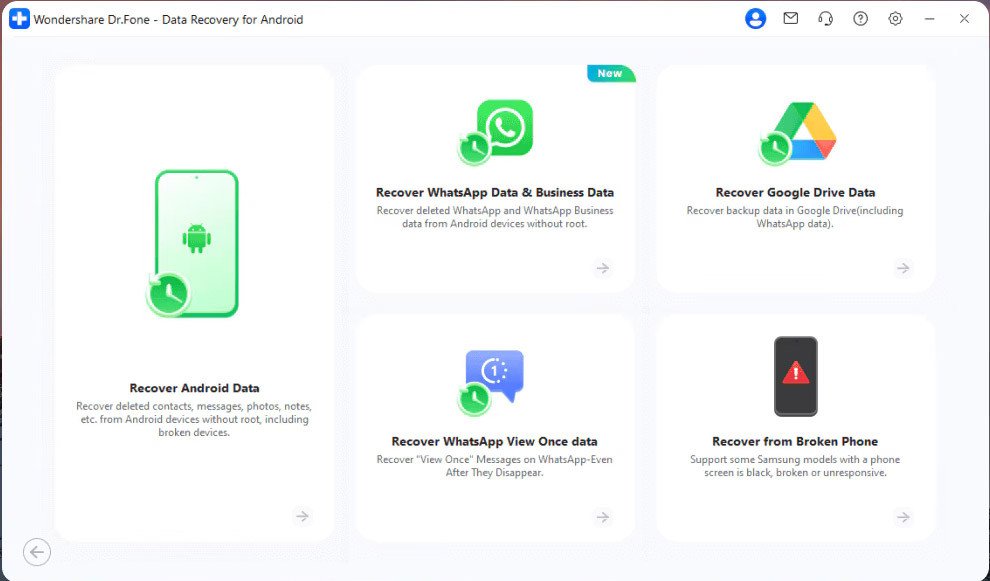
- Data Recovery covers both iOS and Android. On the iOS side, you can recover directly from the device, from an iTunes backup, or from an iCloud backup. The scan shows you deleted files before you commit to restoring them, which is one of the more useful UX decisions here — you see what’s actually recoverable before paying or proceeding. Android data recovery also supports broken phones that won’t turn on normally, which addresses a scenario most tools simply skip.
- System Repair fixes iOS and Android issues that leave your phone stuck — Apple logo loops, black screens, update failures, and similar problems. The iOS repair offers both Standard Mode (preserves data) and Advanced Mode (more aggressive, data loss likely), and the tool walks you through each step clearly.
- Phone Transfer moves data between devices in one click, covering iOS-to-iOS, Android-to-Android, and cross-platform transfers. This is particularly useful when switching from iPhone to Android or vice versa, where native transfer tools tend to struggle with certain data types like WhatsApp conversations.
- WhatsApp Transfer deserves its own mention because it’s genuinely harder to find as a standalone capability. Dr.Fone lets you back up, restore, and transfer WhatsApp chats and attachments between iOS and Android devices, including support for WhatsApp Business. Viber, LINE, and WeChat are also covered.
- Virtual Location lets you change your GPS coordinates on both iOS and Android — useful for privacy, location-based gaming, or testing location-dependent apps. You can set a fixed point or simulate movement along a custom route.
Standout Features Worth Knowing
The iOS Password Manager is one of the quieter but genuinely useful additions. It can surface saved Apple ID credentials, Wi-Fi passwords, app passwords, and Screen Time passcodes directly from your device — handy when you’ve forgotten something and Apple’s own tools give you no path forward.
Phone Verification / Device Diagnostics generates a full report on your phone’s health — battery condition, storage status, system version, and a score you can share. If you’re buying or selling a used phone, this report adds real credibility to the transaction.
The iCloud Activation Unlocker (a newer addition) bypasses iCloud activation lock and can even mute the camera shutter sound — two things that have historically required jailbreaking or sending your device to a third-party service.
Features That Are Missing or Weak
The Virtual Location feature only works when the desktop app is connected — there’s no persistent background GPS spoof that survives a phone reboot without reconnecting. For serious use cases that need a persistent location change, this is a meaningful limit.
And while Dr.Fone covers a lot, cloud-to-cloud transfer (moving data directly between Google Drive and iCloud, for example, without going through a local device) isn’t something it does. If that’s your primary need, you’d be better served by a dedicated migration tool.
Dr.Fone Interface and Ease of Use
This is usually the section that makes or breaks the impression — you can have every feature in the world and still lose users in the first five minutes if the dashboard doesn’t make sense.
First Impressions of the Dashboard
Get 20% OFF on Dr.Fone – Full Toolkit Annual Plan
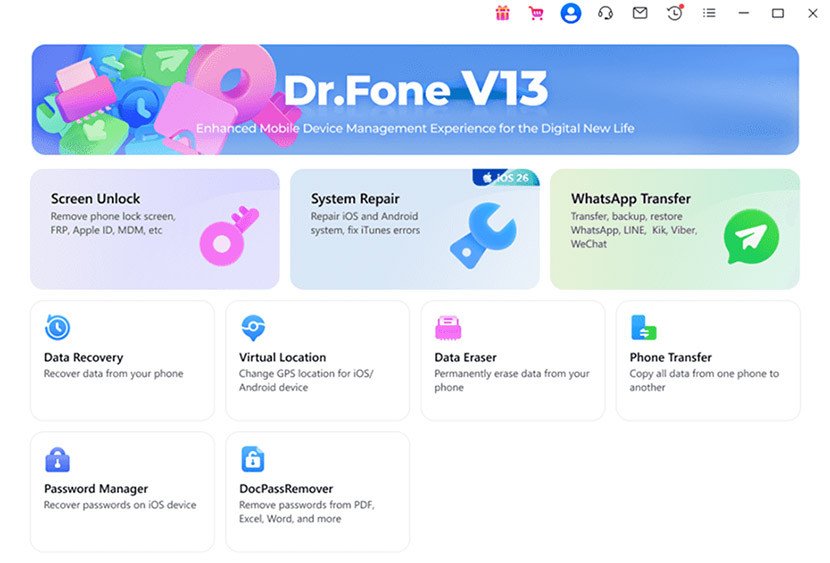
The main dashboard is clean and icon-driven, with each major tool displayed as a tile you click into. It doesn’t feel cluttered even though there are a lot of options, partly because the categories are well-separated. Connecting your phone shows up as a clear prompt, and most features detect your device automatically once plugged in. Personally, I found it more organized than comparable toolkits that try to present everything in a flat list.
Worth noting: the Windows and Mac versions are functionally similar but not identical — a few features are Windows-only, including the DocPassRemover tool and some Android repair functions. If you’re on Mac, check the tech specs page before purchasing.
Learning Curve
Dr.Fone is genuinely accessible for non-technical users. Each module walks you through its process with clear steps and visual cues. The screen unlock flow, for example, shows you exactly which buttons to hold on your phone for DFU or recovery mode entry — something a lot of tools assume you already know.
That said, the sheer number of features can feel overwhelming on first launch. It’s not hard to use, but finding the specific tool you need among the twelve-plus options takes a few minutes of orientation. Most people get comfortable after one or two sessions.
Mobile App and Cross-Platform Experience
There’s a Dr.Fone app for both iOS and Android — the iOS version focuses on storage cleanup and app blocking, while the Android app handles data recovery directly from the phone. These companion apps are useful but limited; the full power lives in the desktop software.
Dr.Fone Air, the browser-based wireless mirroring tool, works on any platform without installation and is a nice addition for quick file transfers when you don’t want to plug in.
How Dr.Fone Works
Understanding the workflow from sign-up to first result helps set realistic expectations — especially since the process varies by feature.
Getting Started
You download the desktop app from the official site — no account creation required upfront. Once installed, launching it shows the main dashboard. You connect your iPhone or Android via USB (or enable the wireless option for supported features), and the app detects your device. From there, you pick the tool you need and follow the guided steps.
The free trial lets you scan and preview results before paying, which is genuinely useful for data recovery specifically — you can see whether your deleted photos are actually there before committing to a purchase.
Integrations and Compatibility
Dr.Fone doesn’t integrate with third-party apps like Zapier or Slack — it’s a standalone desktop tool. What it does connect to is broad in terms of device support: it covers iOS 4 through iOS 26, and Android 2.0 through Android 16, across hundreds of device models including Samsung, Huawei, Xiaomi, OnePlus, and more.
Get 20% OFF on Dr.Fone – Full Toolkit Annual Plan
Backup compatibility extends to iTunes and iCloud on the iOS side, and to local and Google Drive backups on Android. If you’re looking for direct integration with your cloud storage workflow, though, that’s not this tool’s focus.
How Long It Takes to See Value
For most use cases — particularly data recovery and phone transfer — you’ll see whether Dr.Fone works within your first session. The scan-before-you-pay model for data recovery means you get confirmation of recoverable data before making any financial commitment. System repair and unlock functions take longer, usually 10–30 minutes depending on the scenario, but the value (or failure) is clear by the end of that session.
Who Is Dr.Fone Best For?
Features are one thing — but understanding who gets the most out of Dr.Fone day-to-day is where the real evaluation happens.
Ideal Users
Dr.Fone is strongest for individuals who interact with their phones as personal devices rather than managed work tools. The ideal user is someone upgrading to a new phone and needing a clean, complete data transfer; someone dealing with a locked or malfunctioning device; or someone who occasionally needs to recover photos, messages, or WhatsApp data from a backup.
It’s also a good fit for resellers of used phones who want a legitimate, verifiable data erasure record — the Data Eraser tool generates a report you can show a buyer.
Use Cases Where It Shines
If you’re switching from an iPhone to an Android (or the reverse) and want your WhatsApp history to follow you, Dr.Fone is one of the few tools that handles this cleanly. Samsung Smart Switch won’t touch your iCloud-backed WhatsApp data, and Apple’s migration tools don’t move to Android at all.
For someone who’s accidentally deleted photos or messages and doesn’t have a recent backup, the iOS or Android Data Recovery tool is genuinely one of the better options available — it scans deeper than most consumer-level alternatives.
And if you’ve picked up a secondhand phone with an unknown lock status, the Screen Unlock module covers scenarios that would otherwise require visiting a carrier store or a repair shop.
Who Should Look Elsewhere
If you only need one specific thing — say, just a GPS spoofing tool or just an HEIC converter — buying the full toolkit is unnecessary. Dr.Fone sells individual modules, so check whether a single tool at a lower price point covers your need.
If you’re managing a fleet of company devices and need MDM, policy enforcement, or remote wipe at scale, Dr.Fone’s consumer toolkit isn’t designed for that. Wondershare does offer business volume licenses, but that’s a different product conversation.
Users on a tight budget who need just basic phone-to-computer file browsing can often get by with free tools like AnyTrans Lite or Android File Transfer — Dr.Fone’s paid tier is only worth it when you need the deeper recovery, unlock, or repair capabilities.
Why Choose Dr.Fone?
At this point in most software comparisons, people are weighing whether the feature depth justifies the cost. Here’s where Dr.Fone makes a clear case for itself.
Key Advantages Over Competitors
The cross-platform unlock capability — handling both iOS and Android lock scenarios including FRP and iCloud activation — is rare to find in a single tool. Most competitors are platform-specific. That breadth means one purchase can cover situations you haven’t even anticipated yet.
The data recovery scan-before-you-buy approach is a real differentiator. Tools like Tenorshare UltData and iMobie PhoneRescue also offer trials, but the clarity of Dr.Fone’s preview interface is above average — you see file thumbnails and names before committing.
The 2026 Cybersecurity Excellence Award (Gold) in Data Security, presented by Cybersecurity Insiders with backing from 600,000+ security professionals, provides meaningful third-party validation. Add GDPR compliance and AES-256 encryption, and the trust signals are solid for a tool that handles sensitive personal data.
Based on current plans, the Dr.Fone Full Toolkit at $79.95 bundles what would otherwise cost $150+ if you bought the unlock, data recovery, system repair, and transfer modules separately. At that consolidation ratio, it’s genuinely good value for anyone likely to use three or more features.
What Makes It Worth Considering
The combination of breadth, depth, and consistent support for the latest devices is what keeps Dr.Fone ahead of most alternatives in this category. You’re not just paying for today’s phone — you’re covered for the next upgrade cycle too. At this point, the main question is whether the pricing matches what you actually need right now.
Try Dr.Fone for Free
My Experience Using Dr.Fone
Going into this review, the question I kept asking was: does it actually work when you need it, or does it look impressive in demos but fall short in practice?
What I Liked
Get 20% OFF on Dr.Fone – Full Toolkit Annual Plan
The data recovery scan preview is the standout UX moment. Running it on a test device with deleted photos, the thumbnails appeared within a few minutes and were accurate — no ghost results or unrelated files padding the count. That kind of transparency builds trust quickly.
The guided unlock flows were notably clear. The step-by-step prompts for entering DFU mode on various Android models — with the button sequence illustrated — removed guesswork for a process that usually requires a YouTube tutorial running in parallel.
What Could Be Better
The pricing structure is fragmented. If you come in needing data recovery and then realize you also need system repair, you’re potentially buying two modules unless you’ve already opted for the Full Toolkit. It’s not unusual for software to upsell, but discovering mid-task that your current license doesn’t cover what you need creates friction.
Also, the Mac version has a shorter feature list than Windows. The gap isn’t enormous, but it’s enough to catch Mac users off guard — specifically around some Android-related repair tools that are Windows-only. The tech specs page does list this, but it could be clearer upfront on the pricing page itself.
Real User Reviews of Dr.Fone
User sentiment tells you things that feature lists can’t — particularly where a tool succeeds or frustrates in real-world conditions.
What Customers Are Saying
“The WhatsApp transfer from iPhone to Android actually worked. I had 41GB of chat history and Samsung Smart Switch just kept failing. Dr.Fone handled it in two attempts.” — Neil S.
“I updated to iOS 26 without backing up and needed to downgrade. Dr.Fone walked me through it step by step and I got everything back. Cannot recommend enough.” — Tyler J.
“Support was exceptional. My Samsung tablet had been screen-locked for years and a Wondershare engineer literally remote-accessed my computer to fix it. Got all my family photos back.” — Latoya M.
“It worked — but I wish the pricing page made it clearer which features are Windows-only before I bought the Mac version. Had to buy an additional module I wasn’t expecting.” — Sophie R.
“Recovered photos from a phone I thought was totally broken. The chat support got me unstuck quickly. Really solid tool for emergency situations.” — Timothy C.
Overall Customer Sentiment
Most users report genuine satisfaction with the results, particularly for data recovery and phone unlocking — both high-stakes use cases where failure is costly. The recurring complaint is pricing confusion: users who buy a single module and then discover they need another one feel they weren’t given enough information upfront. Support quality, on the other hand, earns consistently positive feedback across platforms.
What People Are Saying in Online Communities
Across online discussions and user feedback forums, a few recurring themes came up worth noting. One pattern: users who’ve tried free tools first come back to Dr.Fone after hitting walls. “I tried three free tools and none of them could find my deleted texts. Dr.Fone found them in the first scan” is the kind of comment that shows up frequently.
There’s also an ongoing comparison thread-style debate with Tenorshare products: “Honestly the UI is cleaner and the WhatsApp transfer actually worked cross-platform, which the other one didn’t.” On the flip side, several users flag the pricing as a sticking point: “The per-feature licensing model adds up faster than expected if you’re not going for the full toolkit from the start.”
A smaller but notable subset of users point out that some unlock features require data erasure — and that this is not prominently flagged before starting. Most acknowledge it’s disclosed in the process, but say it’s worth knowing before you begin.
Dr.Fone Support and Reliability
This is the section most people skip — but if something goes wrong mid-process on a locked phone, support quality matters a lot.
Support Channels Available
Dr.Fone offers live chat support, email support, a detailed help center with step-by-step guides for every feature, and video walkthroughs. The help center is genuinely thorough — most questions have illustrated articles rather than just FAQ text. Live chat is available across plans, which is above average for a tool in this price range.
Response Time and Quality
Based on user feedback, response times via chat tend to be fast during business hours, and the support team is technically capable — the story of a Wondershare engineer using remote access to help unlock a screen-locked Samsung tablet is on the extreme end, but reflects the general pattern of hands-on support rather than scripted replies.
Email response can take longer (24–48 hours is typical), which matters if you’re dealing with a time-sensitive unlock situation. In those cases, live chat is the better route.
Uptime and Reliability
Dr.Fone is a desktop application rather than a cloud service, so traditional uptime concerns don’t apply in the same way. The online components (Dr.Fone Air, Dr.Fone Online Unlock) are cloud-based, and based on available information, no significant outage history has been publicly reported. The desktop app receives regular updates and includes a version upgrade path from Dr.Fone 12 to v13.
Common Complaints About Dr.Fone
Here’s the thing about Dr.Fone’s complaints: most of them are predictable for a toolkit in this category, but they’re still worth knowing before you buy.
Most Frequent Issues
Pricing confusion is the most common friction point. The per-module structure means someone who downloads Dr.Fone expecting full access quickly runs into paywall prompts within the free trial. The Full Toolkit solves this, but the value proposition isn’t always obvious until you’ve already hit the limit.
Some Android unlock scenarios erase data. This is technically disclosed in the process, but users consistently report being surprised by it. If data preservation is non-negotiable for your Android unlock case, check the specific model’s compatibility notes before starting.
Mac feature gaps. As noted, some tools — especially Android-related repair functions — are Windows-only. For Mac users who bought the toolkit expecting full parity, this is a real disappointment.
Are These Dealbreakers?
For most users: no. The pricing structure is frustrating but navigable — the Full Toolkit is the right buy if you’re likely to use more than one or two features. The Android data erasure on unlock is a known limitation of how Android’s security model works, not a flaw in the software itself. And the Mac gap, while annoying, is disclosed in the tech specs.
The one scenario where these could matter: if you’re a Mac user who specifically needs Android repair tools. In that case, the Windows version is the better choice, or a competitor that has full Mac-Android parity.
Get 20% OFF on Dr.Fone – Full Toolkit Annual Plan
Dr.Fone Pricing — What You Actually Pay
Pricing is where most people’s decision either gets easier or harder. Let’s go through what you’re actually looking at.
Pricing Plans Overview
| Plan Name | Starting Price | Billing | Key Features | Best For |
| Dr.Fone Full Toolkit | $79.95 | Annual | All features — unlock, recovery, repair, transfer, WhatsApp, virtual location, data eraser | Anyone needing 3+ features |
| Dr.Fone Basic | $29.95 | Annual | Data manager, backup & restore, screen mirroring for iOS & Android | Phone management & backups only |
| Screen Unlock (iOS/Android) | $24.95 | One-time | Lock screen removal, Apple ID, FRP bypass | One-off unlock tasks |
| Data Recovery | $34.95 | One-time | iOS & Android data recovery | Single recovery event |
| System Repair | $19.95 | One-time | iOS & Android system fixes | Boot loops, stuck screens |
| Virtual Location | $4.97 | One-time | GPS location changer | Location-based use cases |
| Dr.Fone Online Unlock | From $0.99 | Per use | FRP bypass, iCloud removal, SIM unlock via IMEI | Quick online unlocks |
Currently, there’s a special deal: Get 20% OFF on Dr.Fone – Full Toolkit Annual Plan — making the Full Toolkit the best-value entry point for anyone with more than one problem to solve.
Free Trial and Free Plan Details
Yes, a free trial exists for all major modules — no credit card required to download. The trial lets you run scans and preview results (for data recovery, for example, you’ll see your deleted files listed) before you pay for the recovery itself. This is one of the more honest trial models in this category. There is no permanent free plan for the full desktop toolkit, though Dr.Fone Air (the online screen mirroring and file transfer tool) is free to use indefinitely.
Is the Pricing Fair?
In context: the Full Toolkit at $79.95 replaces what would individually cost $24.95 + $34.95 + $19.95 + $24.95 (just for unlock, recovery, repair, and transfer). That consolidation makes it clearly the right buy for anyone likely to use multiple features. The individual module pricing is competitive for single-use scenarios, and the Virtual Location tool at $4.97 is genuinely inexpensive.
Where the pricing feels less balanced is in the annual renewal structure — the initial price is reasonable, but the renewal rate for some plans can be higher. Worth checking before you commit.
How Dr.Fone Compares to Other Tools
If you’re weighing Dr.Fone against other tools, you’re at the right stage. Most people comparing options at this point have already decided what category of software they need — the question is which one fits their workflow and budget best. The differences usually come down to feature depth, pricing structure, and how steep the learning curve is. Here’s how Dr.Fone stacks up.
| Feature | Dr.Fone | Tenorshare UltData | iMobie PhoneRescue | EaseUS MobiMover |
| iOS Data Recovery | ✓ Deep scan | ✓ Deep scan | ✓ Deep scan | Limited |
| Android Data Recovery | ✓ Including broken devices | ✓ | Partial | ✗ |
| Screen Unlock (iOS + Android) | ✓ Both platforms | iOS only | iOS only | ✗ |
| System Repair (iOS + Android) | ✓ Both | iOS only | iOS only | ✗ |
| WhatsApp Transfer (cross-platform) | ✓ | ✓ | Partial | ✗ |
| Free Trial | ✓ Scan preview | ✓ | ✓ | ✓ |
| Full Toolkit Starting Price | $79.95/yr | ~$89.95/yr | ~$79.99/yr | ~$59.95/yr |
| Mac-Windows Feature Parity | Partial | Partial | Better | Good |
Dr.Fone vs Tenorshare UltData
These two are the closest competitors, and the decision often comes down to a specific feature. Dr.Fone wins on Android coverage and cross-platform unlock. Tenorshare’s iOS recovery is competitive, but its Android support and FRP bypass capabilities are narrower. For users with Android-heavy needs or cross-platform transfers, Dr.Fone is the stronger choice. For pure iOS data recovery, the gap is minimal.
Dr.Fone vs iMobie PhoneRescue
PhoneRescue has better Mac-Windows feature parity and a cleaner Mac interface — worth noting if you’re on Apple hardware and primarily need iOS recovery. Where Dr.Fone pulls ahead is Android coverage and the unlock module, neither of which PhoneRescue handles to the same depth.
Which Tool Should You Choose?
If your use case involves Android in any meaningful way — FRP bypass, Android data recovery, or cross-platform transfer — Dr.Fone is the stronger choice. If you’re a Mac user dealing purely with iOS recovery and Mac-native design matters to you, PhoneRescue is worth evaluating as an alternative. This is usually where most people make their call.
Dr.Fone Pros and Cons
Pros
- Widest cross-platform coverage in the category — handles both iOS and Android for unlock, recovery, repair, and transfer in a single toolkit
- Scan-before-you-pay model for data recovery builds trust and reduces the risk of buying something that doesn’t work for your device
- Consistently updated for the latest devices — current support for iPhone 17, iOS 26, Samsung S26, and Android 16
- Strong support quality — live chat, detailed guides, and a track record of hands-on help for complex cases
- 20% OFF currently available on the Full Toolkit Annual Plan, making the all-in value even clearer
Cons
- Per-module pricing adds up quickly if you don’t go for the Full Toolkit from the start — easy to get surprised mid-task
- Some Android unlock scenarios require data erasure — disclosed in the process but not prominently flagged before you begin
- Mac version has fewer features than Windows, particularly for Android-related repair tasks
Is Dr.Fone Safe and Legitimate?
One of the more common questions before downloading any phone management software is: is this actually safe?
Trust and Credibility
Wondershare has been in the software business for over 22 years and operates across a wide product portfolio — Filmora, PDFelement, Recoverit, and Dr.Fone are among its most recognized products. Dr.Fone has 50 million+ active users and 150 million+ downloads, which is not the profile of a sketchy utility tool. The 2026 Cybersecurity Excellence Award (Gold) in Data Security, evaluated by a community of 600,000+ security professionals, provides credible third-party validation.
Data Security and Privacy
Dr.Fone uses AES-256 encryption for data handling and maintains a zero-data-retention architecture — meaning your personal data isn’t stored on Wondershare’s servers after use. The software is GDPR compliant. The privacy policy is publicly available on the Wondershare site. For a tool that accesses your phone’s data, these are meaningful commitments and above average for this category.
Dr.Fone Review — Frequently Asked Questions
-
Is Dr.Fone worth it?
For someone who needs multiple functions — particularly any combination of data recovery, screen unlock, and system repair — the Full Toolkit at $79.95 is genuinely worth it. The scan-before-you-pay model removes the risk for data recovery specifically. For someone who only needs a single, one-off task, a standalone module or even a free tool may be sufficient. The value scales significantly when you’re solving two or more of the problems Dr.Fone covers.
-
Is there a free trial for Dr.Fone?
Yes. All major modules have a free trial you can download without a credit card. The trial lets you run scans and preview results — for data recovery, you’ll see exactly which files are recoverable before paying. There’s no permanent free plan for the desktop toolkit, but Dr.Fone Air (screen mirroring and file transfer) is free to use with no time limit.
-
How does Dr.Fone compare to Tenorshare?
Both cover iOS and Android data recovery at comparable depth. Dr.Fone has stronger Android unlock (FRP bypass) coverage and handles cross-platform WhatsApp transfer more cleanly. Tenorshare UltData is similarly priced and competitive on iOS recovery specifically. For mixed-platform or Android-first needs, Dr.Fone generally comes out ahead.
-
Is Dr.Fone good for beginners?
Yes, more than most tools in this category. Each module uses a guided, step-by-step flow with visual prompts for things like entering DFU mode or putting your Android in download mode. You don’t need technical knowledge to get through most tasks. The main learning curve is navigating the dashboard to find the right tool among the many available.
-
What integrations does Dr.Fone support?
Dr.Fone connects to iTunes, iCloud, and Google Drive for backup-based operations. It doesn’t integrate with productivity tools like Zapier or Slack — it’s a standalone desktop tool. Native device support spans hundreds of Android models and the full range of Apple devices, from older iPhones through the current iPhone 17 and iOS 26.
-
Is this a real Dr.Fone review?
This review is based on thorough research of the official Dr.Fone website and pricing page, analysis of available feature documentation, and synthesis of real user feedback from public forums and verified review platforms. The software was not tested directly on a personal device for this review — features, pricing, and behavior are described based on Wondershare’s published information and community-reported experiences.
-
Can I cancel my Dr.Fone subscription anytime?
Based on available information, Dr.Fone licenses are primarily annual purchases rather than ongoing subscriptions in the traditional sense. Wondershare has a refund policy available on their support site — if you need to request a refund, that’s the best starting point. It’s worth reading the refund policy before purchasing if this is a concern.
-
Does Dr.Fone work for enterprises or teams?
There’s a separate business and volume license tier for teams and enterprises. The consumer toolkit reviewed here is designed for individual use. If you’re evaluating Dr.Fone for a business context, the business plans page on the Wondershare site covers pricing and feature access for multi-seat licenses.
More Questions People Ask About Dr.Fone
-
Does Dr.Fone have a mobile app?
Yes. There are companion apps for both iOS and Android. The iOS app focuses on storage management and app blocking, while the Android app enables data recovery directly from the phone. These are supplements to the desktop software, not replacements — the full feature set requires the desktop application.
-
Can I use Dr.Fone offline?
The desktop toolkit works offline for most features once installed. Features that require an internet connection include Dr.Fone Air (browser-based), the Online Unlock tool, and license activation. Core features like data recovery, system repair, and phone transfer work without an active internet connection after installation.
-
How many devices can I use Dr.Fone on?
Based on current plan information, individual licenses are typically per-device (for the computer, not the phone) and per-platform (Windows or Mac). Licenses cannot be cross-platform — a Windows license won’t activate on a Mac. Check the current plan details for exact device limits per license.
-
Does Dr.Fone offer a money-back guarantee?
Wondershare has a refund policy, though the specific terms vary by product and circumstance. The details are available on their support site. Generally speaking, if the software doesn’t work for your specific device or scenario, it’s worth contacting support before requesting a refund — many issues have workarounds the support team can provide.
-
How long does it take to set up Dr.Fone?
Installation is straightforward and takes a few minutes. Most features are ready to use within minutes of connecting your device — you don’t need to configure anything complex to get started. The initial device detection is automatic once you enable USB debugging on Android or trust the computer on iOS.
-
Can I migrate data from Samsung Smart Switch to Dr.Fone?
Not directly — these are separate tools with different approaches. Dr.Fone’s Phone Transfer and WhatsApp Transfer features can handle transfers that Samsung Smart Switch struggles with (particularly cross-platform and WhatsApp-specific migrations), but they don’t import Smart Switch backup files.
-
Does Dr.Fone work for Xiaomi and Huawei devices?
Yes. Dr.Fone covers Xiaomi, Redmi, Poco, and Huawei devices including Mi Account lock removal — a specific issue for Xiaomi users that few other consumer tools address. Huawei data transfer is also listed as a supported workflow.
-
What happens to my data if I stop using Dr.Fone?
Since Dr.Fone uses a zero-data-retention architecture, your personal phone data is not stored on Wondershare’s servers after each session. Data remains on your device and any local backups you’ve created. Uninstalling the software removes it from your computer without any ongoing data retention concern.
Final Verdict — Is Dr.Fone Worth It?
If you’ve read this far, you probably already have a sense of where this lands. Let’s make it concrete.

Get 20% OFF on Dr.Fone – Full Toolkit Annual Plan
Who Should Use Dr. Fone
Dr.Fone makes the most sense for individual users dealing with any combination of: data loss, screen lock issues, a system that won’t boot properly, or a phone-to-phone transfer that simpler tools can’t handle. It’s especially strong for anyone navigating a cross-platform switch (iPhone to Android or reverse) where WhatsApp history needs to come along. The Full Toolkit is the right tier for this audience — the breadth of coverage means you’re not buying a tool for one problem only to discover you need another one next month.
Who Should Skip Dr.Fone
If you only have one specific, one-time need — say, a single data recovery event or a single unlock scenario — look at the individual module pricing first, or evaluate whether a free tool handles your case. The Full Toolkit is excellent value for multi-use scenarios, but overkill if you’ll touch it once and never again.
Mac-only users who primarily need Android repair tools should also note the platform gap — some Android-related functions are Windows-only, which limits the Mac toolkit’s usefulness for certain scenarios.
Overall Rating
Rating: 4.5 / 5 — Dr.Fone delivers on the core promise of a genuine all-in-one mobile toolkit, with real depth in its recovery and unlock capabilities and consistently strong support. The main things keeping it from a higher score are the fragmented pricing structure (which creates unwanted friction for new users) and the Mac-Windows feature disparity.
Final Thoughts — Should You Try Dr.Fone?
Quick Recap
- Fone is a legitimate, well-maintained mobile toolkit by Wondershare — 22+ years in the market, 50M+ active users, and a 2026 Cybersecurity Excellence Gold Award.
- The Full Toolkit at $79.95 covers what would otherwise cost $150+ if bought as individual modules — good value for anyone with multiple needs. Right now, 20% OFF makes the Full Toolkit Annual Plan even more compelling.
- The free trial with scan preview for data recovery is one of the more honest trial models in this category — see your results before you pay.
- The main limitations are pricing transparency (individual module pricing can surprise new users) and some Mac-only gaps for Android repair tools.
Should You Sign Up?
If you’re evaluating Dr.Fone for a real problem — a locked phone, lost data, a tricky transfer, or a broken system — the free trial is the lowest-risk way to find out if it works for your specific device and scenario. Most people who get this far have already made up their mind, and that’s fair either way. The right answer depends on what you’re solving and whether the Full Toolkit’s breadth matches your situation.